FUTVIO / HOW IT WORKS

Your match ends.
Your trading can continue.

Once configured, the cloud handles the normal trading routine. Here is what happens while you play, after you log out and when a Preview Pack is worth a closer look.

How the cloud workflow works

You play.
The cloud takes over afterwards.

Set it up once. Let the routine run automatically. Your PC can stay off, and you do not need to restart trading after every session.

  1. You play.
    The bot waits.

    Play EA FC on your PlayStation as usual. While the account is unavailable for the bot, trading waits for access.

  2. You finish.
    The cloud checks.

    The cloud bot retries login every 20 minutes. You do not have to keep checking whether the account is available again.

  3. Login succeeds.
    Trading resumes.

    On the next successful login, the bot picks up where it left off. Listing and rebuying continue without a manual restart.

PASSIVE AFTER SETUP

“Passive” describes the normal automated routine: no PC running, no manual relisting and no restart after playing. Account setup, available access and occasional authentication or service issues can still require your attention.

Daily Preview Packs

Preview. Evaluate.
Buy only if it adds up.

The described feature opens the available daily free preview and checks the contents. If the estimated value makes the purchase worthwhile, the bot buys the pack with Coins and sells its tradable contents. Otherwise, it skips the purchase.

The preview is free. Buying the pack costs Coins. An estimated margin is not a guaranteed sale or profit.
Overpriced selling, explained

A selling strategy.
Not a race to snipe.

The overpriced-selling mode presented here focuses on listing cards with a markup and rebuying after sales. Sniping focuses on quickly buying unusually cheap listings. That distinction does not remove the account risks of automation.

Since 2020: no reported bans.

Around six years as of October 2026. A provider statement, not independently audited by Futvio. It is not a guarantee of future account safety.

Source note: the 20-minute retry, automatic resume and Preview Pack details were supplied by the Futvio operator on 6 October 2026. Futvio has not independently tested these behaviours. Cloud trading and the reported-ban history are described on the provider’s website. Sources & transparency.

SET UP ONCE

Three steps
before the routine starts.

01

Create your access

Choose the trial or a plan on our pricing page. Registration happens with the external provider.

02

Connect and configure

Follow the provider’s setup instructions, enable account access and choose budget tiers for your available Coins.

03

Start and monitor

Review the settings and start the automation. You can pause, resume or adjust tiers in the service.

Initial setup and occasional authentication or service issues can require action. EA prohibits automation; using a bot can lead to account restrictions or bans. Read the risk guide.

FUTVIO / COMMUNITY

The numbers.
The screenshots behind them.

A small selection of customer results supplied to us. Explore the original screenshots, from trading activity to Preview Pack discoveries.

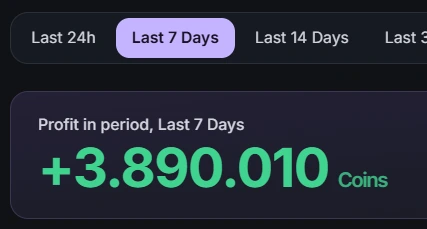
+3,890,010 Coins — Displayed profit · last 7 days
CUSTOMER SNAPSHOT / 01

+3,890,010 Coins

Displayed profit · last 7 days

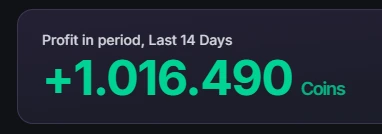
+1,016,490 Coins — Displayed profit · last 14 days
CUSTOMER SNAPSHOT / 02

+1,016,490 Coins

Displayed profit · last 14 days

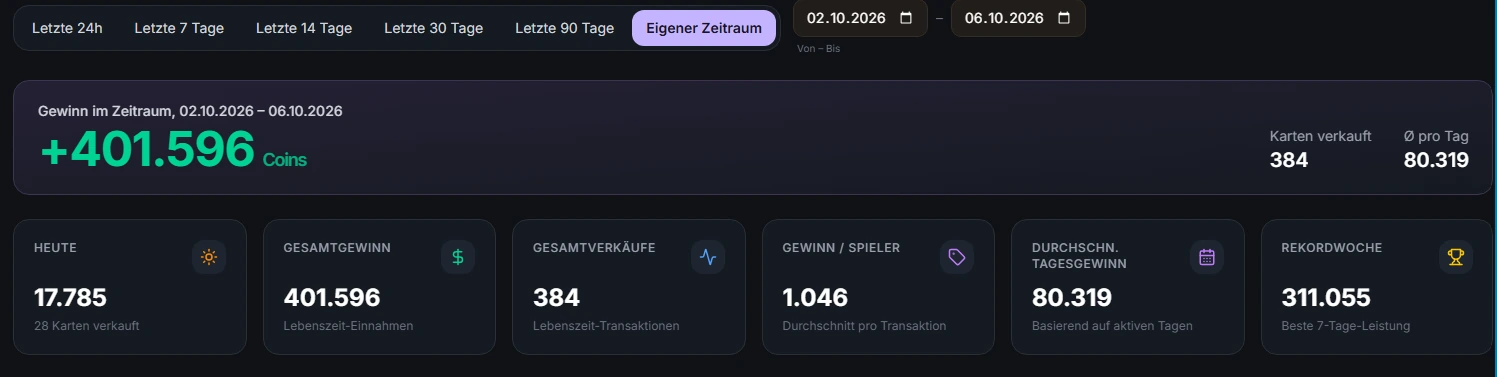
+401,596 Coins — 2–6 October 2026 · 384 cards sold
CUSTOMER SNAPSHOT / 03

+401,596 Coins

2–6 October 2026 · 384 cards sold

Explore 8 more customer screenshots
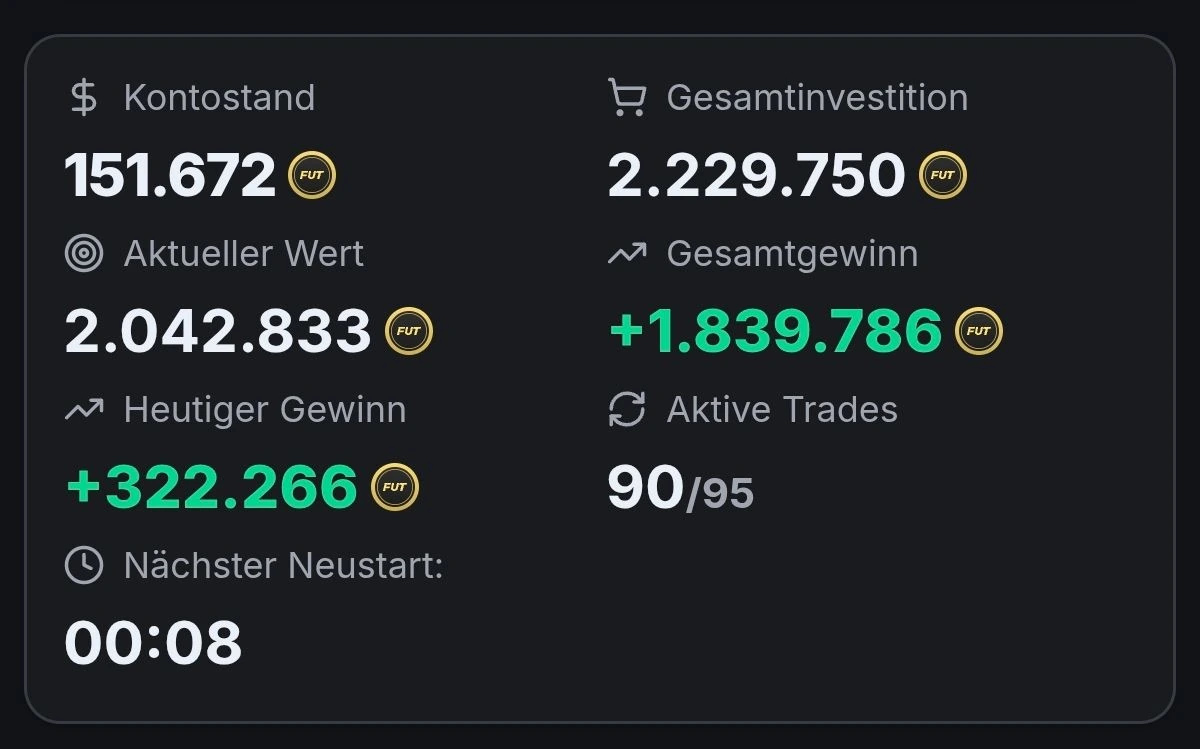
+1,839,786 Coins — Displayed total profit · period not specified
CUSTOMER SNAPSHOT / 04

+1,839,786 Coins

Displayed total profit · period not specified

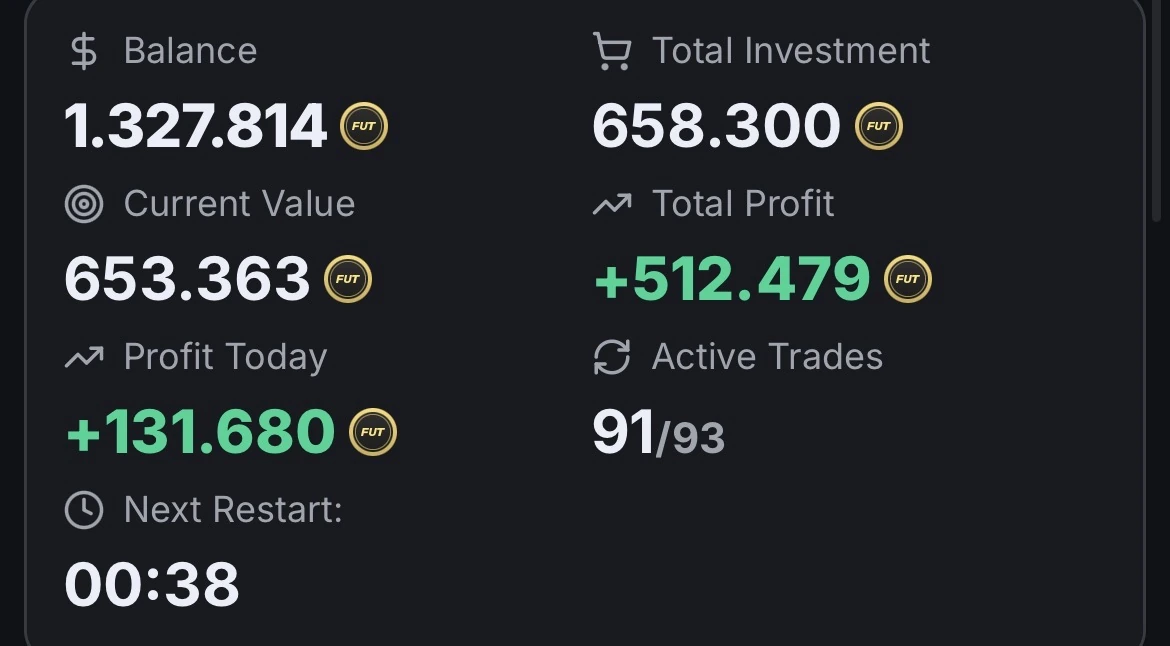
+512,479 Coins — Displayed total profit · period not specified
CUSTOMER SNAPSHOT / 05

+512,479 Coins

Displayed total profit · period not specified

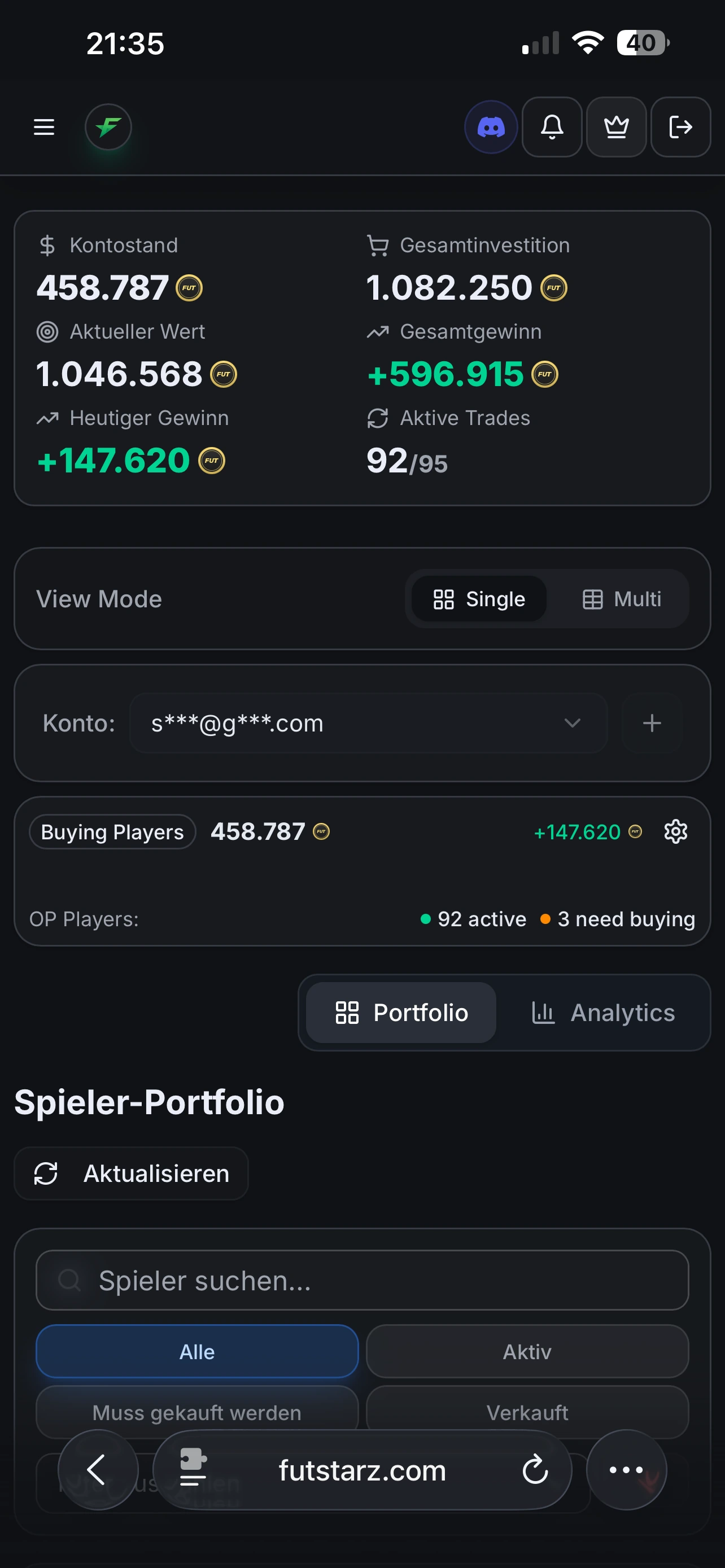
+596,915 Coins — Mobile account view · displayed total profit
CUSTOMER SNAPSHOT / 06

+596,915 Coins

Mobile account view · displayed total profit

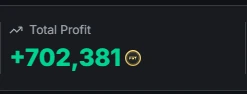
+702,381 Coins — Displayed total profit · period not specified
CUSTOMER SNAPSHOT / 07

+702,381 Coins

Displayed total profit · period not specified

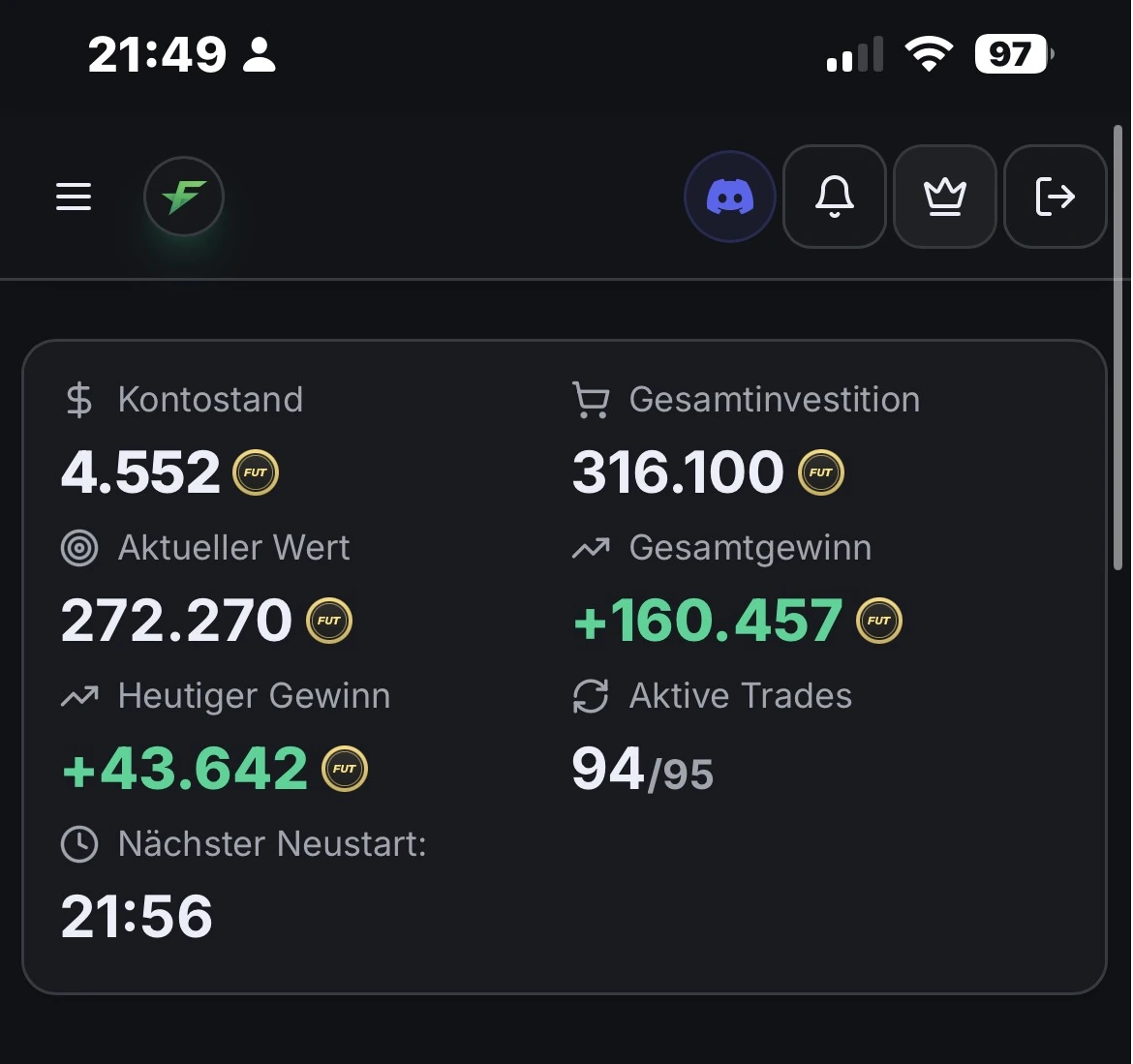
+543,444 Coins — Displayed total profit · 94/95 active trades
CUSTOMER SNAPSHOT / 08

+543,444 Coins

Displayed total profit · 94/95 active trades

+160,457 Coins — Mobile account view · displayed total profit
CUSTOMER SNAPSHOT / 09

+160,457 Coins

Mobile account view · displayed total profit

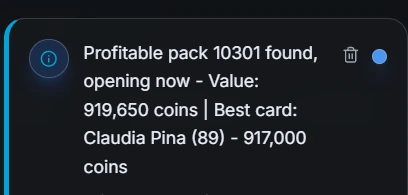
Preview Pack: 919,650 Coins — Estimated contents value in the notification, not net profit
CUSTOMER SNAPSHOT / 10

Preview Pack: 919,650 Coins

Estimated contents value in the notification, not net profit

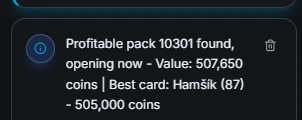
Preview Pack: 507,650 Coins — Estimated contents value in the notification, not net profit
CUSTOMER SNAPSHOT / 11

Preview Pack: 507,650 Coins

Estimated contents value in the notification, not net profit

Selected screenshots supplied by the Futvio operator, not independently verified. Different accounts and periods; these examples do not establish typical or expected results. Coins are in-game currency, not cash income. Pack values are estimates before purchase costs and fees.

See which plan fits your game.

Start with the trial or compare account limits.

Explore plans

Original customer example supplied to Futvio. Individual results, not a forecast.

Can I play on PlayStation while using Cloud-Trading?

In the described workflow, you play normally while the bot waits for account access. It does not need your console or your PC to run its cloud service. Once your game session is over and login is available, the bot can resume automatically. This does not mean it trades on the same account at the same time as your active game session.

Do I have to restart the bot after playing?

According to the workflow supplied to Futvio, the cloud bot retries login every 20 minutes while access is unavailable. On the next successful login, it automatically continues where it left off. A manual restart is not part of this normal routine. Initial setup, working account access and any required re-authentication still matter.

Are Preview Packs free?

The preview is free; purchasing the pack is not. In the described feature, the bot opens the available daily preview, assesses its contents and buys the pack with Coins only if the estimated return makes the purchase worthwhile. It then sells tradable contents. Availability, sufficient Coins, selling fees and changing market prices affect the result.

Does overpriced selling mean there is no ban risk?

No. The overpriced-selling workflow is different from sniping, but that does not make automation authorised by EA. The provider reports no bans reported since 2020. This is a provider statement, not independently audited by Futvio and not a guarantee for your account.

PLAY WITH A PLAN.

Your next move.
Starts here.

Explore the trial. Compare plans. Choose the access that fits your team.

Start now

Advertisement · Independent affiliate brand. Service and contract provided by an external provider.

Your game. Your plan.Trial & 30-day access
Start now